Claude Code Cheat Sheet
One page with the Claude Code flags, commands, shortcuts and file locations you reach for most days. Print it, pin it next to your terminal, or share the dark version. Everything on the image is repeated below as text, so you can search it, copy from it, and read it with a screen reader.
- Find the flag, command or shortcut you need without opening the reference
- See what each permission mode runs without asking, and what Plan Mode does and does not block
- Know which file a setting, an instruction or a hook belongs in
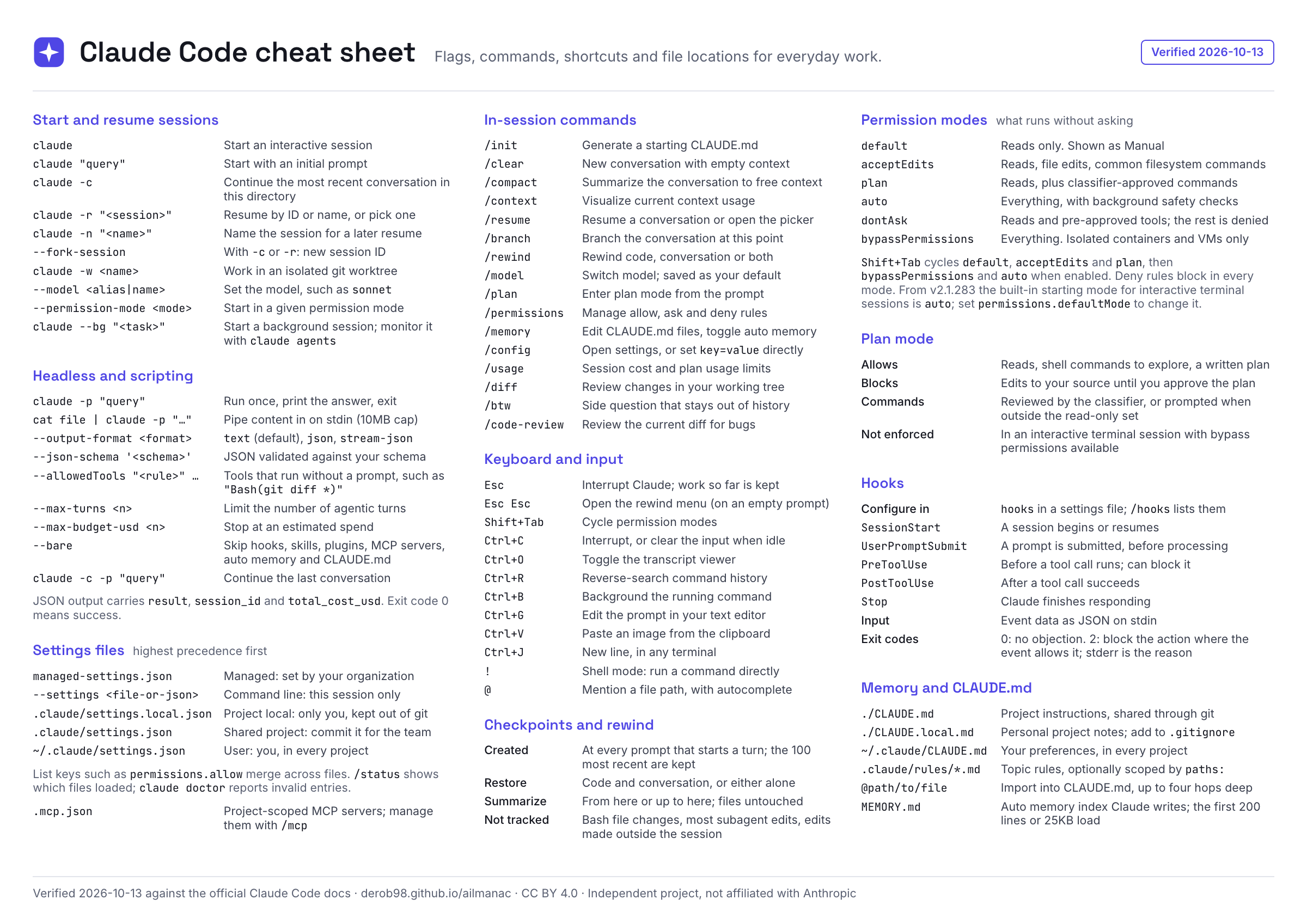
Download
- Download the PDF — A4 landscape, one page, selectable text. Print at 100% on A4, or "fit to page" on US Letter.
- Download the PNG, light — 2400 px wide.
- Download the PNG, dark — 2400 px wide, for screens and screenshots.
- Open the HTML source — self-contained; add
?theme=darkto the address for the dark version.
The sheet is licensed CC BY 4.0: share it, print it and adapt it, with attribution to AILmanac.
The sheet as text
Start and resume sessions
| Command or flag | What it does |
|---|---|
claude | Start an interactive session |
claude "query" | Start with an initial prompt |
claude -c | Continue the most recent conversation in this directory |
claude -r "<session>" | Resume by ID or name, or pick one |
claude -n "<name>" | Name the session for a later resume |
--fork-session | With -c or -r: new session ID |
claude -w <name> | Work in an isolated git worktree |
--model <alias|name> | Set the model, such as sonnet |
--permission-mode <mode> | Start in a given permission mode |
claude --bg "<task>" | Start a background session; monitor it with claude agents |
Going deeper: The claude CLI: Flags That Change Outcomes and Git Worktrees & Parallel Workstreams.
Headless and scripting
| Command or flag | What it does |
|---|---|
claude -p "query" | Run once, print the answer, exit |
cat file | claude -p "…" | Pipe content in on stdin (10MB cap) |
--output-format <format> | text (default), json, stream-json |
--json-schema '<schema>' | JSON validated against your schema |
--allowedTools "<rule>" … | Tools that run without a prompt, such as "Bash(git diff *)" |
--max-turns <n> | Limit the number of agentic turns |
--max-budget-usd <n> | Stop at an estimated spend |
--bare | Skip hooks, skills, plugins, MCP servers, auto memory and CLAUDE.md |
claude -c -p "query" | Continue the last conversation |
JSON output carries result, session_id and total_cost_usd. Exit code 0 means success.
Going deeper: Headless Mode & the Agent SDK.
Settings files
Listed highest precedence first: when two of them set the same key, the one higher in the table wins.
| File or flag | Scope |
|---|---|
managed-settings.json | Managed: set by your organization |
--settings <file-or-json> | Command line: this session only |
.claude/settings.local.json | Project local: only you, kept out of git |
.claude/settings.json | Shared project: commit it for the team |
~/.claude/settings.json | User: you, in every project |
List keys such as permissions.allow merge across files. /status shows which files loaded; claude doctor reports invalid entries.
| File | What it holds |
|---|---|
.mcp.json | Project-scoped MCP servers; manage them with /mcp |
Going deeper: settings.json: The Config System and MCP Servers in Claude Code.
In-session commands
| Command | What it does |
|---|---|
/init | Generate a starting CLAUDE.md |
/clear | New conversation with empty context |
/compact | Summarize the conversation to free context |
/context | Visualize current context usage |
/resume | Resume a conversation or open the picker |
/branch | Branch the conversation at this point |
/rewind | Rewind code, conversation or both |
/model | Switch model; saved as your default |
/plan | Enter plan mode from the prompt |
/permissions | Manage allow, ask and deny rules |
/memory | Edit CLAUDE.md files, toggle auto memory |
/config | Open settings, or set key=value directly |
/usage | Session cost and plan usage limits |
/diff | Review changes in your working tree |
/btw | Side question that stays out of history |
/code-review | Review the current diff for bugs |
Going deeper: Context Management.
Keyboard and input
| Key | What it does |
|---|---|
Esc | Interrupt Claude; work so far is kept |
Esc Esc | Open the rewind menu (on an empty prompt) |
Shift+Tab | Cycle permission modes |
Ctrl+C | Interrupt, or clear the input when idle |
Ctrl+O | Toggle the transcript viewer |
Ctrl+R | Reverse-search command history |
Ctrl+B | Background the running command |
Ctrl+G | Edit the prompt in your text editor |
Ctrl+V | Paste an image from the clipboard |
Ctrl+J | New line, in any terminal |
! | Shell mode: run a command directly |
@ | Mention a file path, with autocomplete |
Checkpoints and rewind
| Aspect | Detail |
|---|---|
| Created | At every prompt that starts a turn; the 100 most recent are kept |
| Restore | Code and conversation, or either alone |
| Summarize | From here or up to here; files untouched |
| Not tracked | Bash file changes, most subagent edits, edits made outside the session |
Going deeper: Checkpoints & Rewind.
Permission modes
| Mode | What runs without asking |
|---|---|
default | Reads only. Shown as Manual |
acceptEdits | Reads, file edits, common filesystem commands |
plan | Reads, plus classifier-approved commands |
auto | Everything, with background safety checks |
dontAsk | Reads and pre-approved tools; the rest is denied |
bypassPermissions | Everything. Isolated containers and VMs only |
Shift+Tab cycles default, acceptEdits and plan, then bypassPermissions and auto when enabled. Deny rules block in every mode. From v2.1.283 the built-in starting mode for interactive terminal sessions is auto; set permissions.defaultMode to change it.
Going deeper: Permissions & Permission Modes.
Plan mode
| Aspect | Detail |
|---|---|
| Allows | Reads, shell commands to explore, a written plan |
| Blocks | Edits to your source until you approve the plan |
| Commands | Reviewed by the classifier, or prompted when outside the read-only set |
| Not enforced | In an interactive terminal session with bypass permissions available |
Going deeper: Plan Mode.
Hooks
| Event or aspect | Detail |
|---|---|
| Configure in | hooks in a settings file; /hooks lists them |
SessionStart | A session begins or resumes |
UserPromptSubmit | A prompt is submitted, before processing |
PreToolUse | Before a tool call runs; can block it |
PostToolUse | After a tool call succeeds |
Stop | Claude finishes responding |
| Input | Event data as JSON on stdin |
| Exit codes | 0: no objection. 2: block the action where the event allows it; stderr is the reason |
Going deeper: Hooks: Deterministic Automation.
Memory and CLAUDE.md
| File or syntax | What it does |
|---|---|
./CLAUDE.md | Project instructions, shared through git |
./CLAUDE.local.md | Personal project notes; add to .gitignore |
~/.claude/CLAUDE.md | Your preferences, in every project |
.claude/rules/*.md | Topic rules, optionally scoped by paths: |
@path/to/file | Import into CLAUDE.md, up to four hops deep |
MEMORY.md | Auto memory index Claude writes; the first 200 lines or 25KB load |
Going deeper: CLAUDE.md & Memory Files.
Sources & further reading
Each section was checked against these official pages on 2026-10-13:
- CLI reference — start and resume sessions, headless flags
- Run Claude Code programmatically —
-p, output formats,--bare, the JSON result fields and exit codes - Settings files and precedence — the five settings sources, their order, list merging
- Explore the .claude directory —
.mcp.jsonand the other file locations - Commands — in-session commands
- Interactive mode — keyboard shortcuts and input prefixes
- Checkpointing — what a checkpoint captures, the rewind menu, the limits
- Choose a permission mode — the six modes, the
Shift+Tabcycle, Plan Mode - Hooks reference and Automate actions with hooks — events, locations, exit codes
- How Claude remembers your project — CLAUDE.md locations, rules, imports, auto memory
Next
- The claude CLI: Flags That Change Outcomes — the reasoning behind the flags on the sheet
- Permissions & Permission Modes — choose a mode deliberately
- Hooks: Deterministic Automation — turn a habit into a guarantee